Should our classrooms be like Mario Kart?

Mario Kart is one of my favourite racing games. And recently it has made me think about the implications of what’s happening in my classroom.

To succeed in Mario Kart, not only do you have to drive fast and stay ahead of the pack, you also need to know how to use power-ups. Power-ups are picked up by driving into the power-up blocks. When you drive over one of these blocks, the game will assign you with a power-up. However, Mario Kart likes to work on a handicap system. mario kart power-upsBasically the further you are ahead in the race, the power-ups you get never boost your speed. So if you’re coming first, you are only ever given banana peels and turtle shells as power-ups. You leave banana peels on the track so others slip on them or you throw the turtle shell at whoever gets in front of you. You are not given power-ups to get you further ahead. If you’re further behind in the race, the game will give you a range of power-ups like:

-star (gives you a huge speed boost and you’ll take out anyone you touch)

-thunderbolt (zaps everyone else in the race and makes them small so you can run over them)

And if you’re really behind, you get Bullet Bill, Bullet Bill turns you into a bullet and you rip through the track at super fast speed, blasting everyone that gets in your way. Bullet Bill is designed to give anyone coming last with a fighting chance at the race. Basically the power-ups gives everyone an even chance of winning all the way through the race.

So what does Mario Kart have to do with my classroom?

For anyone that has been following my blog, you’ll know that I’ve been implementing gamification with my year 10 science class. (Click here for more details) We wrapped up the first gamified unit of work recently. While I was evaluating the effectiveness of gamification, I noticed the leaderboard. The winning team had over 400 points and the last team had 30 points. (Points were awarded for completing and submitting class and homework tasks). So what happened to the team with 30 points? This team wasn’t doing nothing. They weren’t being lazy. I regularly helped them in class and saw them do their work. They just didn’t hand it in.

While I haven’t asked them why they haven’t handed it in (yet), if I was them I would say to myself ‘Why bother? It’s not like our team will ever catch up.’ It is like when you are so far behind in a car racing game that you re-start the race because there’s no point of continuing. In most classrooms, there’s some kids who are behind for some reason (went overseas for a lengthy period, have poor reading skills, etc). For many of these kids, it’s like being very behind in a racing game. Everyone is on their 5th lap while they’re still on their 1st lap. They want to re-start the race and have another go. But they can’t. How can schools and teachers give them power-ups like in Mario Kart. I want to give those kids Bullet Bill so they will still be engaged in the game. But how? And what about the kids who are always a few laps ahead of everyone else? Are teachers keeping the game challenging enough for them?

Mission complete – an evaluation of gamification

My first attempt at gamification has wrapped up. The Great Science Race was a science unit of work on experimental design, but had gaming elements integrated such as points for completing work, passwords to level up, achievement badges and leaderboards. For more details please see my previous post.

On the last lesson, my class completed a short survey to what they thought of gamification. Click here to see the survey questions. The sample size was only 21 students, but the results were overall very positive towards gamification.

Here are some of the results:

When asked what they liked most about the unit of work, students indicated the following:

  • Working in groups/teams
  • The topic fun and entertaining
  • The competitive atmosphere
  • Doing experiments
  • Getting a prize at the end if your team wins

When asked about how to improve the unit of work, students indicated the following:

  • More experiments/more harder experiments
  • More organisation in handing in tasks
  • More interactive activities
  • Assigning everyone in the group with roles/tasks

The next unit of work this class is doing is Chemical Changes, a topic involving learning about atoms and chemical reactions. The class has indicated that they still like working in teams, getting points and having a leaderboard. However, I’m going to scale back on the passwords and the achievement badges.

Enhancing formative assessment & personalised learning – add on benefits of gamification

It has been two weeks since the implementation of gamification in my Year 10 Science class. Five out of six teams have completed the first two quests and have been awarded the achievement badge of “Cool Scientist” and the password to level up to Quest 3. Engagement and motivation has definitely increased for 99% of the students. I now get nervous when I log onto Edmodo because I know there’ll be heaps of work uploaded by the students with comments such as “please mark asap”. At the end of every lesson, almost every student submits one or two pieces of work on Edmodo for me to mark. I have to be honest – marking their work every night has been hard work. However, because the students are handing in quality work so regularly, I can easily analyse their areas of strengths and areas for improvement.

Before I go into this further I want to emphasise that every teacher, including myself, knows the benefits of formative assessment (For non-education readers formative assessment is about finding out what students can and cannot do regularly in class tasks. Students are given detailed written feedback. In many ways it is more effective than making students sit an end-of-topic exam). However, many teachers know how difficult it is to gather student work regularly for assessment. Many classrooms involve students doing a task and then the teacher going through the answers together with the whole class. Students mark the answers themselves and many students do not know what they need to improve on and more importantly how they can improve.

So back to gamification …. Since the students are so keen to submit their work, I had an opportunity after every lesson to see whether they “get it”. And what I found is that the design of scientific experiments is much harder for this class than I expected. I also found out they cannot construct tables to present data in a way to show trends. While most students understood independent, dependent and controlled variables, a selected number of students still didn’t. From this I was able to provide detailed written feedback via Edmodo for each student after every lesson. I was also able to plan mini-lessons at the start of each lesson to go through the concepts they did need to improve on. This was followed by students working in teams on their quests.

I can see so much potential with using gamification to enhance formative assessment, which branches off into better personalised learning plans. When I implement gamification for the next topic, I want to use it to enhance personalised learning. Here’s my idea – When students complete quests in the game, there are multiple parallel levels (tasks) that I as the teacher can give the students depending on their need. For example, the next topic is chemical reactions. If a student is capable of completing word chemical equations, I can give them the next level of writing chemical equations with chemical symbols as their “level up”. However for a student who needs more time with word equations I will provide them with more levels of practicing chemical equations. Points and leveling up is tailored for each student. I know this is a very ambitious plan and I’m still ironing out some ideas, but I think using gamification to engage and motivate, enhance formative assessment and better inform personalised learning can reap great benefits for our students.

Gamification – is it actually working in the classroom?

I don’t like lugging stacks of cardboard and paper for recycling, but it has to be done. While I know it’s good to recycle, it still feels like a chore to do it. Similarly many of my students don’t like completing and submitting their work, even though they know it’s good for them. Doing work and handing it in can often feel like a chore and many students do it to avoid punishment. So how can I make my students want to hand in work? Perhaps by making it fun?

But how do I make it fun? While nothing beats designing learning that’s authentic, relevant and engaging, there are always some areas of the syllabus that is mandatory to teach, but it’s not very exciting to 15 year olds. So I started to implement gamification with my Year 10 science class. I wanted to see whether gaming elements in the classroom will increase their motivation and engagement in learning. The unit of work is that has been “gamified” is called The Great Science Race and uses game mechanics such as a narrative, quests and achievement badges. For more information on the gamification of this unit of work, please see my previous post. But in a nutshell I have turned a unit of work about setting up science experiments into a game. The unit has a story line, worksheets have been grouped into quests and students work in teams to complete their quests to receive points and achievement badges. A leaderboard has been set up in the classroom to show the ranking of each team.

So how is it going so far?

Term 2 has started and it’s the first day that students are returning to school after a two-and-half week holiday. When one of the students asked me what topic we were studying this term, I replied “scientific investigations”. He groaned: “Not all the independent variables stuff. It’s so boring”.  But when I explained that the topic is a game and how the game would work, the class, including the student who previously groaned, were very excited. They laughed at the story of the secret society of epic scientists, but they were very excited about the achievement badges and the leaderboard. They quickly chose their teams and started working on their first quest.

After two lessons only two teams out of six have submitted their work. They were awarded 5 points on the leaderboard. On the third lesson the students saw the rankings on the leaderboard for the first time. The teams who were ranked first were delighted, and the teams who were on zero points worked extremely hard to ensure they caught up. One team, who was on zero points, very diligently completed most of the work from Quest 1 in a day (including doing a lot of extension work after school). They are now ranked first on the leaderboard.

leaderboard photo

I did ask myself whether the leaderboard was encouraging students to rush their work and not spend enough time on it. However, the work they submitted so far is of the same quality or better than their usual standard. But now they are submitting their work quicker and more regularly, which is allowing me to better identify their strengths and areas for improvement.

I am still in the early stages of implementing gamification so watch this space for more updates on gamification in my classroom.

Gamification in the classroom


Games based learning is supposed to be the next big thing. So when I revamped a unit of work for Year 10 based on designing scientific investigations, I decided to “gamify” the unit of work.

I was inspired by a YouTube video by Seth Priebatsch on gamification, where elements of gaming can be added to education. After also seeing presentations by Dean Groom and Ben Jones I have  come up with my first “gamified” set of learning experiences.

The normal non-gamified version

Here is the unit of work in its regular, non-gamified version. It is like many units of work in high schools – sequential, everyone does the same thing, etc. In a nut shell the unit of work is about how to design and carry out fair experiments to test a prediction, how to record results accurately, how to make sure your results are reliable and how to write up a report to share you findings.

scientific investigations 2011_blog version

So here’s the gamified version

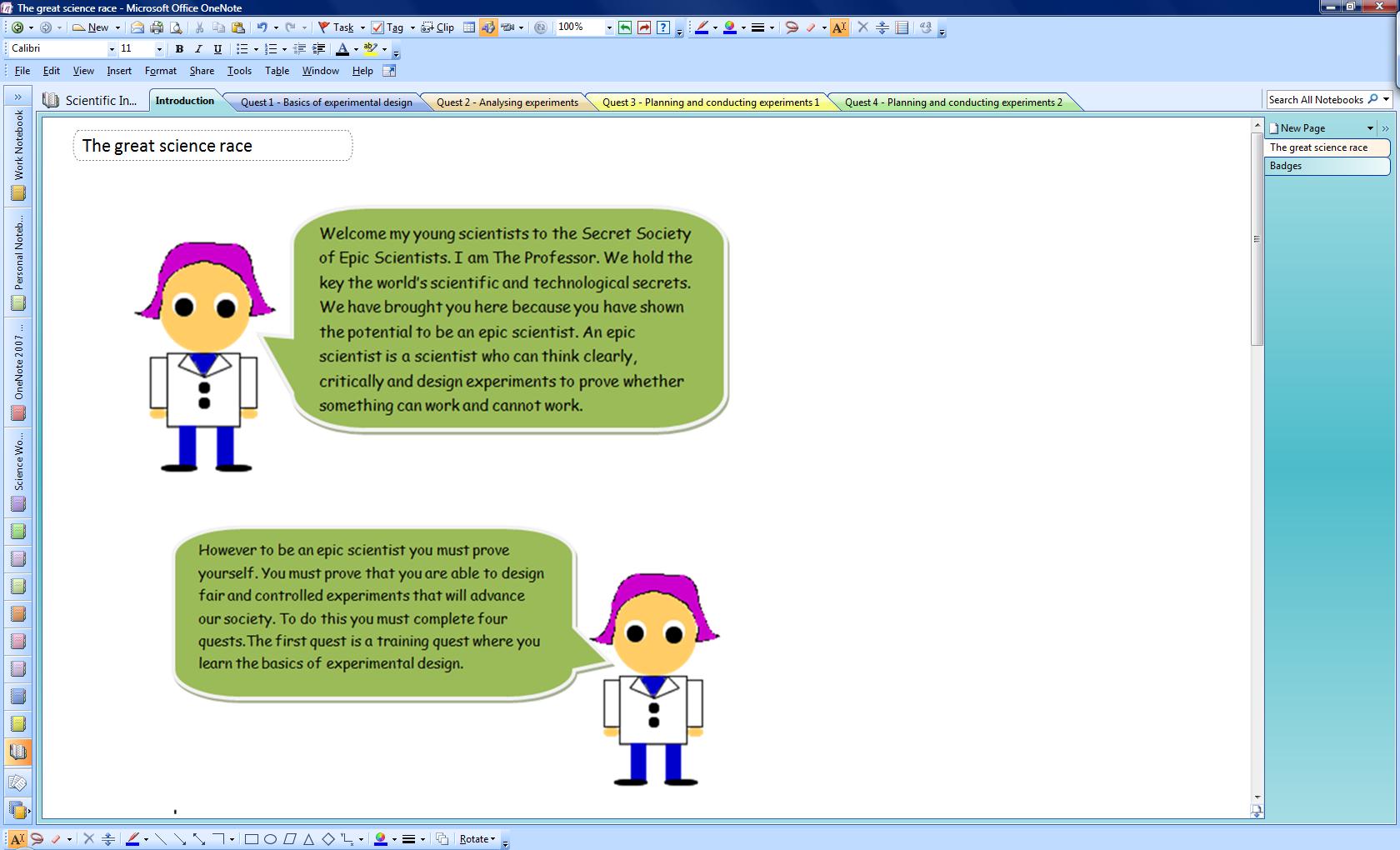
The unit of work has been turned into a game called “The great science race”. At the start students are introduced to The Professor, who explains the overall game narrative. It’s sort of a  corny narrative. If anyone has a much better narrative, please let me know!


The game is divided into four quests. Each quest has a number of tasks where some are compulsory and others are optional. All tasks have been assigned points that reflect their difficulty level. For example, a fairly easy task where students have to tick whether an experiment is controlled or not will allow students to gain 5 points on completion. Whereas a more difficult task with more higher-order thinking questions will allow students to gain 10 points on completion.  This is set up to encourage students to undertake more difficult tasks. There will be a leadership showing the students’ scores.

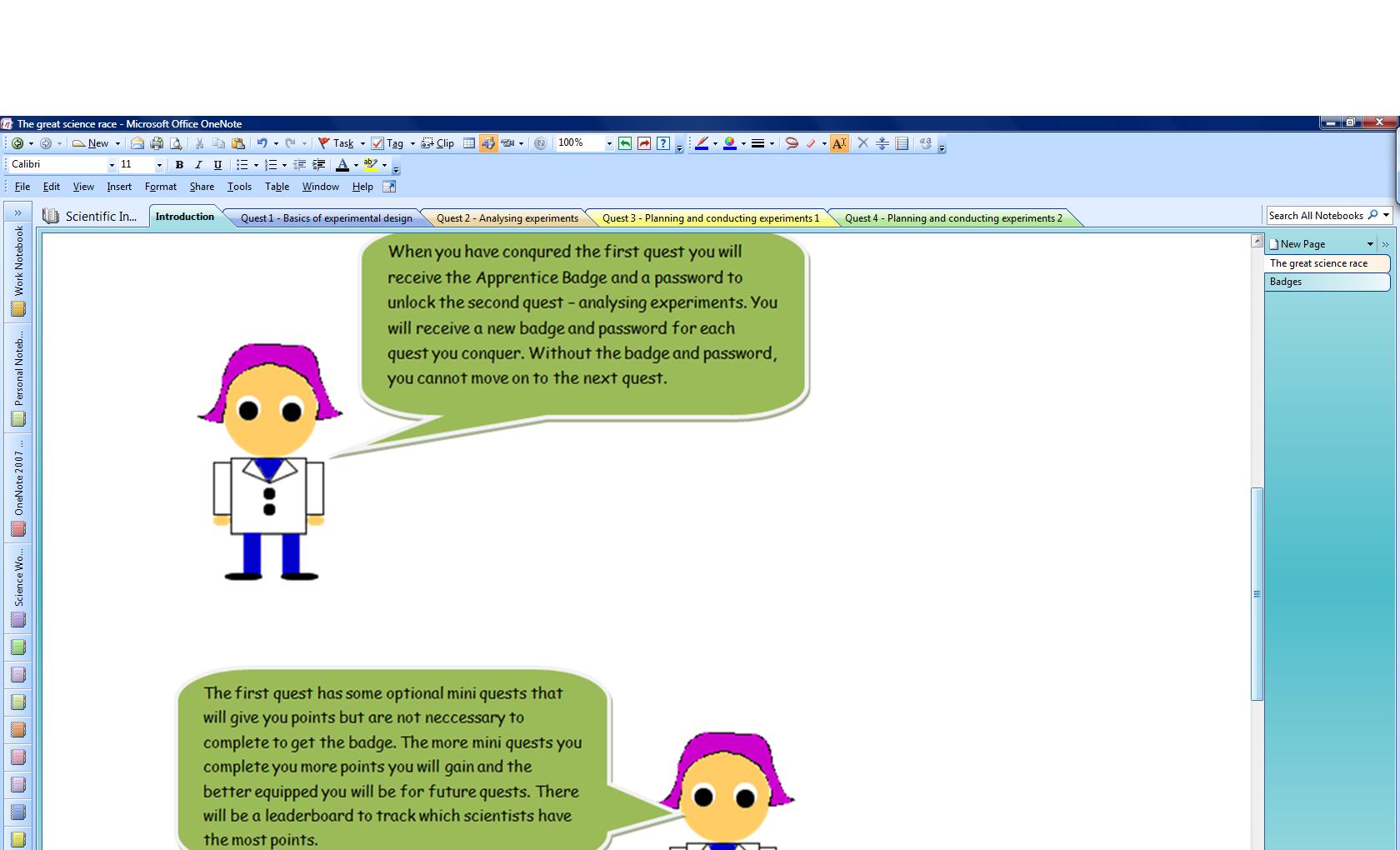
Quest 1 is the training quest and introduces students to the  basics of experimental design (for science nerds these are the basics like the types of variables, the meaning of accuracy and reliability, when to use a control, etc). There are three compulsory tasks in Quest 1. These tasks need to be completed in order to gain the apprentice badge and a password to level up and unlock Quest 2. Quest 1 also has a number of non-compulsory tasks that will add to the students’ score. Like Quest 1, the other three quests require students to complete certain tasks before they are awarded a badge and a password to level up and unlock the next quest.

apprentice badge  cool scientist badge  distinguished scientist badge  epic scientist badge

Quests 3 and 4 involve students choosing a problem from a list and designing an experiment to solve the problem. The problems are given different points depending on their level of difficulty.

The gaming platform

So how can I implement this game? I could program it into Adobe Flash and turn it into a FLV game, but I haven’t got the time at the moment. So I decided to use the exiting resources that I’ve got:

-The game narrative, quests and the tasks within the quests will be given to students at the start of the unit of work as a OneNote notebook. The introduction (which contains the game narrative and explanation of badges) and Quest 1 will be unlocked sections. Quest 2, 3 and 4 are different sections which has been password protected. Once students have been awarded the relevant badge they will get the password to unlock the section.

-Edmodo will be used to give students their badges and password. The class will be a group on Edmodo. This will mean that a post to the class group will be seen by all students. A “small group” will be created for each student team. Posts to small groups will be seen only by students in that small group. This means that students can have discussions amongst each other and with The Professor (me) without the rest of the class seeing. Once a student team has completed a Quest, they convert that OneNote section of the quest into a pdf document and use the “turn it in” function in Edmodo to submit it for marking. The Professor (me) will mark the quest and provide feedback. Points, badges and passwords will be given to students via posts to their Edmodo small group. Updates on which teams’ progress on badges and points will posted on the Edmodo class group.

So that’s it for the time being ….

This unit of work will be implemented in a week’s time. There will be some classes doing the non-gamified version and my class (and others) doing the gamified version. I shall update the progress on this blog.

I am also applying the same gamification techniques to a Year 7 unit of work on the classification of living things.

Watch this space …. 🙂

Teaching writing – a high school perspective

For many high school teachers, teaching students how to write can be a challenge. I have often found it a challenge to have my students write sustained pieces of text. But in recent weeks I have had some successes.

I have a Year 7 science class that consists of students who need additional support in literacy. Many of these students are also learning English as a second language. One of the first things they learn in Year 7 is to write an experiment report (Think back to high school science. It is the report that has Aim, Equipment, Method, Results, Conclusion). This week they completed their assessment task on writing an experiment report on an experiment they did that separated sand and salt. I was so impressed that all students were able to write the experiment report independently. In previous times I have had other students who had higher literacy skills that could not do it as well as these Year 7s. So what did I do different?

I have used the strategy of deconstruction, group construction and independent construction for a few years now. Whenever we need to write something, we look at an example first and deconstruct the structure and language features of the text. Then we try to write one together as a class and in small groups. This is followed by the students writing independently. I have always emphasised purpose and audience when I set a writing task for my students.


In the past many students still struggled with the last step of writing independently. What I did different this time was to provide students with more opportunities of writing independently and marking their work immediately during the lesson. In high school we often mark student work after the lesson and provide students with written feedback. From this experience I found that marking the piece of writing with the student watching and getting the student to correct their writing then and there is more beneficial than collecting the students’ work, marking it then having the student read the written corrections and comments. I used the strategy of getting the students to read out a sentence/paragraph that contains a mistake. Nine times out of ten, they pick up the mistake when they read it out loud. You cannot do this if the feedback is delayed. The opportunity for students to self correct would have passed.

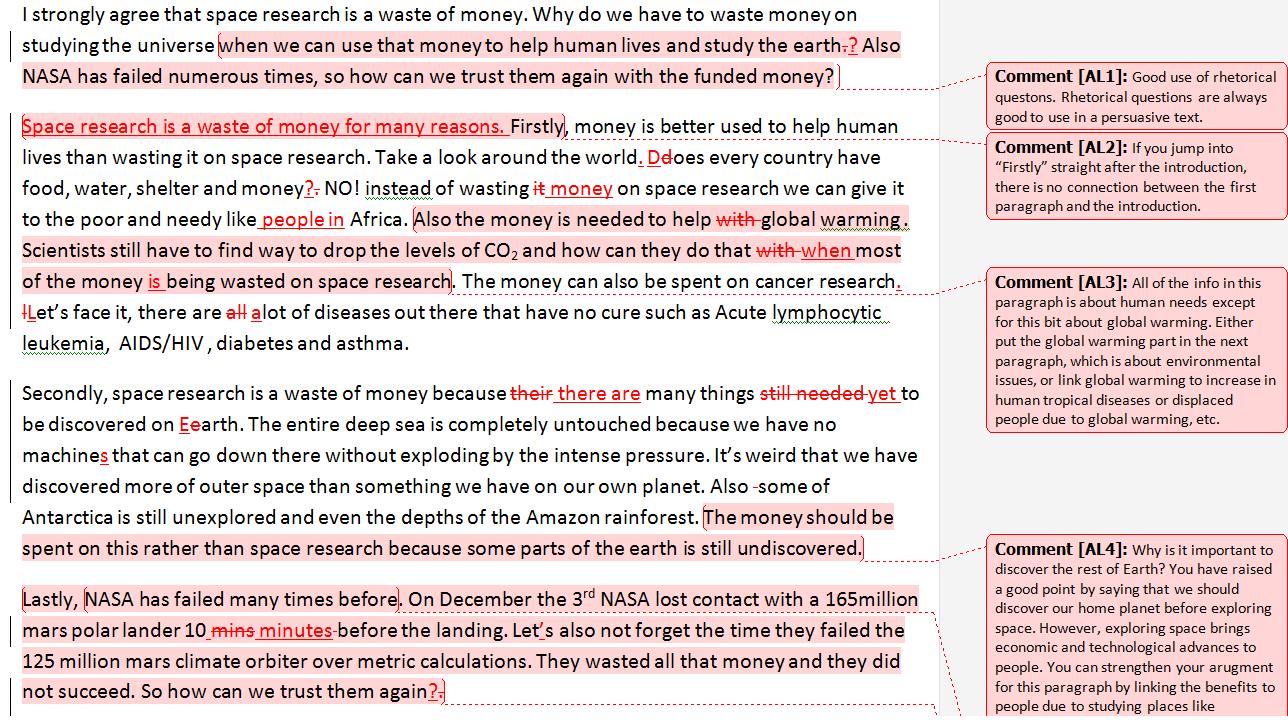
I followed a very similar process with my Year 10s. My Year 10s are writing a persuasive text on whether space research is a waste of money. Like the Year 7s we looked at a sample persuasive text to analyse the structure and language features. They then worked in small groups to write a persuasive text on whether they believed the Big Bang theory explains the origin of the universe. Like the Year 7s I marked their writing with them. Since they had 1:1 laptops I used Track Changes and Comments in Microsoft Word to make corrections and record comments on what they have done well and what they need to improve on while I’m speaking to them. Students also marked each other’s writing using marking criteria.

In light of these reflections I think immediate feedback is the key. Teachers need to provide students with more opportunities to discuss their work with them and with other students very shortly after completing the task. Once again the difficulty of implementing this will be time and the pressure to ‘teach the content’. But the way I see it, what is the point of ‘pushing through the content’ when students cannot clearly articulate their understanding.

The fun theory – making technology fun for teachers

Why aren’t more teachers adopting technology? That’s a question that is constantly raised in educational circles. There are loads of literature on the barriers of technology integration – time constraints, lack of knowledge, lack of confidence, the crowded curriculum, external exam pressures, etc, etc, etc. But for a moment, let’s look at the teachers who DO integrate technology. They still teach to a crowded curriculum. They still need to prepare students for high stakes exam. They too have 24 hours in their day. They too have experienced lessons where the technology failed. So what’s the difference?

I’ve been testing Mouse Mischief this week. Mouse Mischief is a Microsoft add-on software to PowerPoint that allows multiple mice to connect to a PowerPoint presentation. Essentially it is a clicker system. This week was the first time I tried to connect 28 wireless mice. (I’ve had many previous successes with 15 mice) I had a class of extremely excited Year 10 students, each holding their own wireless mouse and …. it didn’t work. All of the mice refused to connect to the PowerPoint when the same mice connected with no problems just two days before. But instead of quitting Mouse Mischief for good, I investigated the problem over the weekend and will try again next week. Mouse Mischief isn’t the first technology that has failed on me. There have been many other cases. But each time I investigated the problem, came up with a solution and tried it again.

However, this takes time. A lot of time. Sometimes I feel like I’m a first-year out teacher again as I would spend hours each school night and the weekend exploring web tools and other software and solving technical issues. I could have easily stuck with my existing resources and strategies that I have tried out before and know it works for my students.  Giving students a worksheet is easier. Changing the activity so that it is enhanced by technology is hard work. Why do I take the hard way?

Because it’s fun.

I love technology. I love video games. I love computers. I always have. I don’t see those long hours at night exploring web tools as work. Going by the Twitter and Yammer conversations, many other teachers who are confident integrators of technology find it fun as well. But for other teachers technology is not fun. For them continuing what they already do without technology (and are successful with their students) is like taking the escalator and integrating technology is like walking up a long flight of stairs. So what will make them try the hard way and walk up a long flight of stairs?

Going by the fun theory as shown in the videos, other teachers who are not regular technology integrators may also take the harder path if it’s fun. If we can make technology fun for teachers who are not as confident, they will be more likely to explore things on their own, take risks and trial-an-error with technology and spend time modifying their own existing strategies and resources to integrate technology. Making things fun can change people’s attitude and behaviour. The hard part is how.

Good professional learning – what is it like?

Over the past two weeks I have provided professional learning to teachers, received professional learning myself and worked with a group of very talented educators in discussing what good professional learning is. So I thought I should reflect upon professional learning further …

I’m currently enrolled in a Graduate Certificate of ICT Education. At the moment I’m doing a subject that focuses on electronic print media production (using Adobe Photoshop, Illustrator and Indesign). At the last lecture I was extremely bored. I didn’t find the activities relevant or engaging. Basically I didn’t see the point of what we were doing.

But I’ve also delivered professional learning where the participants were bored and disengaged. Over February and March I have presented hands-on workshops on integrating Adobe Flash in classroom practice. One session was highly successful and one session was dismal.

The successful session had teachers buzzing with excitement. They couldn’t believe how easy it was to use Adobe Flash to make animations and amicably discussed how they would integrate this in their classrooms. The teachers who picked up the skills faster went off to make animations of their choice while other teachers continued to follow my instructions step-by-step. The two hours flew by and evaluations were positive.

The dismal session had bored teachers. They still actively participated but they were doing it so they wouldn’t appear rude. Most of the evaluations revealed the teachers were disengaged and didn’t see the workshop as worth their while.

So what did I do in the two sessions that gave such different outcomes?

According to a report by Education Services Australia for the Australian Government on ICT professional learning, there are several elements to good ICT professional learning, including a focus on student learning and relevance to classroom context.

In the successful session I ran the workshop for science teachers. Being a science teacher myself I have already explored ways of integrating Adobe Flash animations into the curriculum. I focused on using Adobe Flash as a tool for students to represent their understanding. I began with a discussion of students having difficulty conceptualising dynamic scientific processes such as chemical reactions and presented Adobe Flash animations as a strategy to help students to conceptualise these processes. Teachers then worked together to make an animation showing a neutralisation chemical reaction or an animation on a scientific process they were interested in. So in the third session there was a focus on student learning and it was relevant to the teachers’  classroom contexts. More importantly the software was taught not for the software’s sake, but as a way to enhance student learning.

This is where I went wrong in the dismal session, which was with teachers of technology and applied sciences. While I did mention that the teachers could use animations to show processes in recipes, I didn’t place enough focus on student learning or its relevance to the teachers’ classroom context. In other words I taught Adobe Flash for the sake of Adobe Flash.

This is where my uni course falls over as well. At the moment I’m learning Photoshop for the sake of Photoshop. However I wasn’t as polite as the teachers in the second session. I left the lecture and went to the bottle shop.

What teachers can learn from video games

I’ve recently integrated an Xbox racing game into my Year 10 science class. Students played Formula 1 2010 to learn about Newton’s laws (click here for more info). This got me back into video games. Over the weekend I started playing Fable II – an action role playing game (RPG) on the Xbox. I’ve always been a huge fan of RPGs, more than any other game genre. Whenever I play RPGs, I become totally immersed in the game. I can spend hours being totally focused on the game. Every time I tell myself to stop I’d say to myself “let’s just finish this village first” or “let’s just defeat this boss first”.

While many teachers think of video games as recreational activities or even ‘a waste of time’, teachers can learn a lot from video games. How can we transfer the elements of video games that make the player sit in front of the screen, focused on hours on end, into the classroom? I found myself pondering this whilst playing Fable II.

I think video games harnesses many elements of educational learning theories associated with cognition and motivation. Here’s three elements:

1)      Video games are challenging, but too challenging.

In Fable II you are presented with missions or tasks that you have to complete. The game gives you enough information at the start to get you going, but you have to work it out for yourself by talking to characters in the game and finding clues in the virtual world. It’s often not easy to complete the mission. However, the game provides you with enough clues that you can complete the mission in a timeframe that won’t make you quit the game for good. This sounds really familiar to Vygotsky’s zone of proximal development (ZPD), where it is proposed that effective learning occurs when the learning experience is placed between what a learner can do independently without help and what the learner cannot do. Closely associated with ZPD is the concept of scaffolding, where hints and strategies are provided to help the learner bridge the gap between what they can do and cannot do. Video games often place the player at the ZPD, and guides them from what they can’t do initially to defeating that impossible boss, and level up! In Fable II, verbal and visual clues are provided to help you complete a mission.

2)      Choice and personalisation

Fable II allows you to choose to be male and female and to be good or evil. Throughout the game, you are presented with choices that give you points for being good or evil. Eg. When you find a missing bottle of wine in the village, you have a choice of giving it to an alcoholic or his relative who wants to help him with his alcohol addiction. Giving the alcohol will give you points towards being evil. Giving the alcohol to the relative will give you points towards being good. (I accidentally stole a toy from a chest at someone’s house and have gained some evil points). Fable II also gives you a choice to complete the main game or to go off and play mini-games in other worlds, then go back to the main game. It also allows you to choose your own clothes, etc, which gives you a personal connection to the game.

Student direction is one of the elements in the Quality Teaching Framework. I find that students will usually be more motivated to complete a task and be more self-regulated if they have chosen to do the task themselves. If they feel they have some ownership on the task, the more likely they’ll be engaged with the task. Like in Fable II, teachers can provide students with more choice in what they want to learn and more opportunities for personalisation.

3)      Ability to take risks

Video games allow you to take risks. If you do something wrong, you die, but you can come back and try again. In Fable II I know I can try out some new skills I’ve acquired in the game knowing that if I stuff it up, I can revise my strategy and have another go at it. In video games you are encouraged to adopt the strategy of trial and error and learn from your mistakes. In contrast a lot of educational tasks only let you take one shot at it. As teachers, perhaps we need to create opportunities that allow students to have multiple attempts at a task and encourage them to reflect on how they can improve on their previous attempts.

4)       There is a strong narrative

Fable II, like all other RPG games, has a strong narrative. It has a storyline that involves mystery and human emotions such as revenge. This is the main reason I like RPG games more than any other genre. Racing, fighting and puzzle games do not have storylines. I still play these games but they don’t glue me to the screen.

From personal experience I found that many students also like stories. Narrative is another element of the Quality Teaching Framework. By linking interesting stories with mystery and suspense, teachers can also glue their students’ attention to the lesson.

After finally being able to detach myself from the Xbox, I find myself wondering how can we as teachers create learning experiences that have the same engaging factors as video games? Or perhaps I just like video games a little too much.

Mucking around

My current attempt to integrate Xbox racing games into science is generating interest amongst a fair few teachers. My class loves it. As one student said today “All classes should have an Xbox”.

So why aren’t more classes using the Xbox?

A few weeks ago I ran a professional learning session for science teachers on how they can integrate Xbox games into teaching Newton’s laws of motion. I suggested an array of activities to cater for students of a range of abilities. Yet the Xbox booking sheet only holds my initials as no other teacher has requested it for their classes. As the faculty’s head teacher and the school’s technology coordinator, I want to reflect on how to encourage teachers to implement what they learn in professional learning sessions, particularly with technology.

There are many reasons why teachers may not implement what they learn in professional development courses. However, I want to focus on the need to ‘muck around’. With technology in particular, it’s essential to muck around and spend time to explore the software before deciding how to use it to enhance learning. In a reading I had to do for uni Richardson (2009) highlighted that teachers need to make a personal connection with the technology before being able to consider the pedagogical implications of the technology for their classroom practice. IMHO, to make this personal connection, you need to muck around.

With the Xbox, I spent a lot of time mucking around (playing three different racing games to decide on the best game for my class, which game mode to use, which race track, difficulty level and how much freedom students had in choosing players and racing tracks to ensure time efficiency). Then there was mucking around with hardware. Which data projector was best? What cables did I need? Overall it involved two weekends of playing Xbox at home, several visits to video game shops and several hours of playing the Xbox at school. And I thoroughly enjoyed every minute of it! 🙂

In contrast, the other teachers didn’t have this opportunity.  All they had was a half hour session of me showing them how to set up the Xbox, how to play Formula 1 2010 and the various activities they can implement for their classes. They didn’t have the chance to discover for themselves how the Xbox worked and the potential it can have on their students’ learning. They didn’t have the chance to muck around for hours playing different types of games and reflecting how the games can be used in their teaching.

The hard part now is how do I create these opportunities where teachers can muck around, self explore and reflect? How do I create opportunities for teachers to want to muck around?

Note: The school’s teachers have been fantastic at adopting other technologies such as IWBs and 1:1 laptop initiatives. Perhaps the Xbox takes relatively longer to get used to.