Learning about learning from the London Underground

I am currently on holidays in London. London is a fairly easy city to get around if you speak English fluently, but I have an extremely bad sense of direction (I sometimes still get lost in my hometown of Sydney). I am just someone who just takes a little longer when getting my bearings with a new place.

I am in London with my partner. He has an extremely good sense of direction and learns his way around new places quickly.In London, he has been the one leading the way from our hotel to the nearest underground station, Southwark. He has been the one figuring out which stations we need to change at and which colour lines we need to go on. I’ve just been daydreaming while following him. Even though I have walked from the hotel to the Southwark station many times, I wouldn’t be able to tell you how to get there. I looked like I knew what I was doing, and I was successful at getting from A to B, but really I had no idea what I was doing. I didn’t even bother looking at or carrying a map of the Tube, because I knew I didn’t have to use it. I can just follow my partner.

Today my partner was sick. While he was resting in the hotel room, I ventured out into London city by myself for the first time. The first thing I noticed was that there were orange light poles that pointed to where Southwark station was, telling you when to keep walking straight and when to turn a corner. I never noticed these before. I made it to Southwark station without getting lost at all. I wanted to get to the British Natural History Museum and worked out I needed to change at Westminster station for the green district line. I was much more aware of signs that gave clues to where I was supposed to go. If I was with my partner, I would never have noticed those signs because there was no need to notice them.

This experience has made me reflect on the way I have designed learning for some of my students. Some students generally take more time to do some things (like how I am with learning new directions). This may be team work, a mathematical concept or extended writing. In these situations many teachers, including myself, often hold our students’ hands and lead them from A to B; just like how I was led from A to B. We give our students scaffolds that tell them exactly what to do. We work through questions in worksheets as a whole class so all students have to do is copy the answers from the board or write down what they heard from another student. Students look like they know what they are doing, but really they were like me, just following someone who knows what they are doing.

But what if we just let our students get from A to B by themselves? Why are we so scared of letting them find their own way? They might take a little longer, or take the wrong turn and have to double back. Instead of assigning an extended writing task and giving them a scaffold straight away, why don’t we let students figure it out by themselves, but provide the clues for them. Figuring out something by yourself is one of the most powerful learning experiences. How can we design learning experiences that allow our students to do that? How can we design learning experiences that strike a balance between giving students the freedom to discover things for themselves and enough guidance so that they are set up for success?

Rocking with Smarties

The rock cycle is often a boring topic for middle school students. In NSW, Australia, students learn about the rock cycle in year 7 or year 8. Many students also don’t fully grasp the rock cycle because it is something they can’t see happening in front of them and they can’t picture the long time scale (millions of years) in their minds.

I have often used food to make the rock cycle more interesting (see my previous post using cake to learn about the structure of the Earth). So when I came across this prac activity on using chocolate to model the rock cycle, I couldn’t resist. I used Smarties to model the rock cycle with my year 7 class. Here are some photos.

This slideshow requires JavaScript.

My year 7s loved it. Some boys who usually vocalise very clearly they found this topic boring were the most eager to show me the chocolate sedimentary rocks they made. “Miss, when we placed the textbooks to squash the Smarties. That’s like compaction but we did it in a really short amount time, right?”, said one of these boys. They had fun and learnt a quite abstract and complex concept at the same time. What more can you ask for as a teacher?

I did modify the worksheet slightly to include the benefts and limitations of scientific models.

If you are planning to do this activity with your class, have a hand-held vacuum cleaner ready. No matter how careful kids are, there will be chocolate crumbs everywhere.

Professional learning – a journey

Many faculties at my school purchased iPads to be used as student devices this term. Our aim is to use these iPads in combination with the other ICT tools we have already (1:1 laptops, interactive whiteboards, flip cams, etc) to further move into 21st century leaning.

I am now in the process of organising teacher professional learning to make sure that teachers can maximise the learning benefits of these iPads. To do this I have been browsing through many blogs and websites that detail how others have done this. Many of these blogs and sites contain information like “102 ways to use your iPad in the classroom”. In the professional learning I have attended for iPads, they have also mainly focused on apps. Now that’s all well and good as teachers need to know what apps are out there, which apps have been tried by teachers and how they have used those apps in their classrooms. According to this article, there are four stages to teachers’ integration of technology in teaching learning:

Stage 1  – Preliterate end users – Teachers with minimal experience with the technology – The challenge here is to help these teachers see the benefits of technology in making their classroom instruction and administration easier

Stage 2 – Software technicians – Teachers who have used apps, software and/or the piece of technology for personal use

Stage 3 – Electronic traditionalists – Teachers proficient in using technology to extend traditional classroom instruction such as electronic worksheets and drill and practice quizzes

Stage 4 – Techno-constructivists – Teachers who utilises technology to allow students to construct their own understanding, create products and solve problems

At the moment I think I do stage 1, 2 and 3 quite well when I design professional learning for other teachers. However stage 4 is much trickier. How can I design professional learning that will help teachers on a journey to become techno-constructivists? It will require teachers to confront and reflect on their perspectives of how students learn, which are framed by many previous experiences and assumptions.

How would you approach this? Have you done this before? Share your ideas and thoughts 🙂

Learning in Term 3

Now that Term 3 has come to an end, I am again analysing the data from Year 7’s evaluation of their learning. Year 7s complete a weekly reflection on their learning as well as an end-of-term evaluation. Their end-of-term evaluations gives me an idea on how they feel about how I structure their learning activities so that I can adjust the next term’s learning accordingly.

For Term 3 our project based learning focus has been on newspapers. For 8 weeks, students deconstructed the language features of news articles and put together a range of articles on the Olympics, the Paralympics and other newsworthy items. Some of these articles were written in groups and some were written individually. Year 7s then selected some of these articles to put together a newspaper using Microsoft Publisher. Each news article involved students revising the article at least twice using the goals, medals and missions structure of feedback. In Term 3 we also did science experiments on Tuesdays that were based on sport science under the theme of the Olympics. For half of Term 3 the class worked with Year 6 students from Merrylands East Public School on Murder under the Microscope, an online environmental science game where students acted as forensic scientists to solve a crime involving the pollution of a catchment area. One new activity I introduced in Term 3 were weekly revision quizzes. These quizzes were essentially thirty-minute pen-and-paper-exams that tested Year 7’s understanding of concepts we have learnt during the week. However, they were allowed to refer to their books if necessary (I just think this is more realistic of real life. When in your life do you come across something you can’t do and force yourself to sit there for 30 minutes without makin any attempt on finding out how to do it. I also think it gives a purpose to students’ book work and instil in them a routine of what revision and studying looks like and feels like.) With these weekly revision quizzes, students mark each other’s work. The quiz is divided into concept areas such as algebra, language features of newspapers and scientific investigations and marks are awarded separately to each concept. Students then look at their performance for each concept area and write a short reflection on what they are good at and what they need to improve on.

So this week, Year 7s completed an end-of-term evaluation of their learning on Survey Monkey.

Term 3’s evaluation consisted of these questions:

  • What is your favourite subject?
  • What makes this subject your favourite subject? What do you like about it?
  • Rate how much you enjoy the following activities (students choose from “I enjoy it”, “I find it OK” and “I don’t enjoy it”
    • Project work
    • Science experiments
    • Maths and numeracy
    • Murder under the Microscope
    • Edmodo homework
    • Rate how much you learn from the following activities (students choose from “I learn lots from it”, “I learn some things from it” and “I barely learn anything from it”)
      • Project work
      • Science experiments
      • Maths and numeracy
      • Murder under the Microscope
      • Edmodo homework
      • Do you want to continue doing project work on Mondays and Fridays?
      • What are 3 things you have learnt from the newspaper project?
      • List 3 things you want to improve on next term.
      • If you were the teacher of 7L, what would you do to improve learning for the class?

So here are the results:

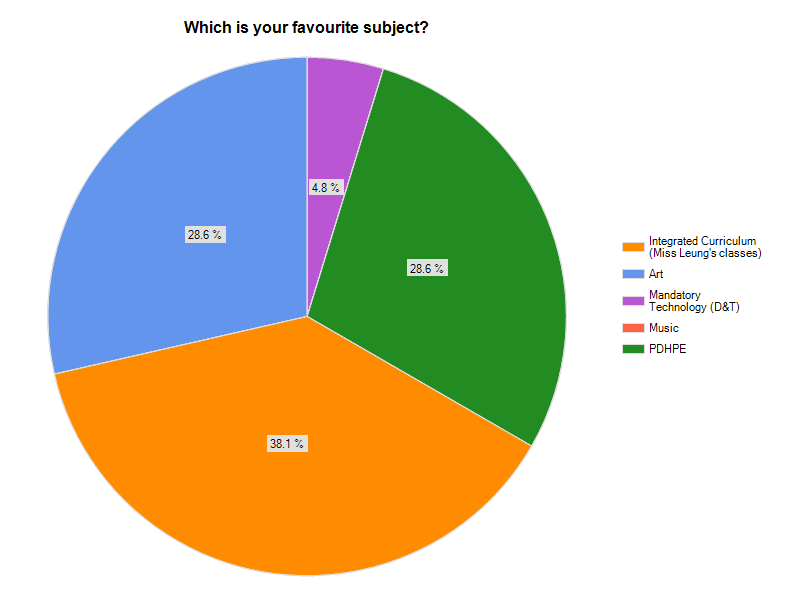
What is your favourite subject?

A pie chart of Year 7's favourite subject

I’m going to conclude by just saying it takes a lot to beat PDHPE as students’ favourite subject.

Reasons why integrated curriculum is their favourite subject

Below are some of the responses from students who chose integrated curriculum as their favourite subject:

Because we get to have fun in those classes and do interesting stuff.


The experiments we do and how all the subjects are put into one class.


It involves technology.


There are so many opportunities to do fun activities and showing people my work.


Some of the major themes from this question are that students find integrated curriculum classes “fun”. They also like using technology such as laptops and tablets for their learning, as well as having 5 subjects embedded into one class.  Some students enjoy having their work showcased on the class blog.

Rate how much you enjoy the following activities

A sector bar graph showing year 7's enjoyment rating of different activities

Rate how much you learn from the following activities

A sector bar graph showing how much year 7s learn from different activities

What are 3 things you have learnt from the newspaper project?

 A word cloud was created for students’ responses to this question where the larger the word in the word cloud, the more frequent that word appeared in the responses.

A word cloud showing what students have learnt in the newspaper project

List 3 things you want to improve on next term.

This term was the first time students wrote features of effective team work for their improvements for the following term. In previous end-of-term evaluations, students often listed relatively superficial things they’d like to improve on such as write faster or finish work faster. For this term’s evaluation, the majority of students listed features of team work skills such as listening to other students, working as a team and self control. Many students also identified specific areas of content they’d like to improve on such as algebra or types of scientific variables. This is in contrast to how they listed their improvements in previous evaluations where many students wrote umbrella terms such as numeracy or literacy.

For me, this shows an increased level of maturity in the way they assess their learning. While I can’t attribute the cause of this change to any particular strategy I’ve used, I do have a strong feeling it is to do with the goals, medals and missions structure of providing feedback in their PBL tasks and also their weekly reflections on their revision quizzes. Over a term I think most Year 7s have increased their self-awareness of their own learning.

What have I learnt?

For most of this year I have been experimenting on strategies on guiding students to become more effective learners. The PBL initiatives, the goals-medals-missions structure of feedback, the weekly revision quizzes and weekly reflections of learning have all been things aimed at allowing my students to further develop into effective learners. While I always knew that features such as working together and being self-aware of your strengths and areas for improvement are equally important as understanding subject-specific concepts, I think teaching my Year 7s for 5 different subjects have really made that clear to me. When I think back to how I structure my learning in previous years for my science classes it has always been more focused on content rather than developing students into effective learners. When I do eventually return to teaching science classes only, the way I will structure learning for those classes will be very different to how I used to structure them. Teaching an integrated curriculum has so far been one of the best professional learning I’ve had.

Using technology to enhance the learning of scientific language

I have always found teaching the separations topic in year 7 science difficult. This is the topic where students learn a range of separation techniques like sieving, filtering, evaporation and distillation. Students have to be able to explain how this separation techniques work based on the physical and chemical properties of substances, which at times involve them having a good understanding of particle and atomic theory. One barrier to this topic is the large amounts of scientific technical language. Students have to know the definitions of these words and know how to use them in their scientific explanations – solution, suspension, solute, solvent, dissolve, soluble, insoluble. These words are just a small proportion of the entire list of terms students are expected to learn.

So with my Year 7s this year I decided to test out how online tools can help make the learning of these words easier and more effective for students. Previously I’ll use a lot of literacy strategies like barrier games, spelling games and concentration games to give students lots of practice at using the words. This year I decided to do it a little bit different. Here’s what I did.

1)      Introduce the need to separate mixtures in the context of obtaining clean, drinking water by using an adaptation of the river story.

2)      Students played a game to learn the definitions of solution, suspension, solute and solvent using Student Response Network. These PowerPoint slides were used to play the game:

3)      Students then performed an experiment to have hands on experience on solutes, solvents, suspensions and solutions.

4) Students then used a science dictionary to construct a table of terms and definitions.

Excel illustrated science dictionary

4)      Students worked in groups using the table of terms and definitions to create multiple choice questions for each term via testmoz.com. Each group uploaded their quiz for the rest of the class to complete. I chose testmoz.com because it is easy to use for Year 7s, doesn’t require registration of any sign up and it gives students a URL to share their quiz with others.

I found that this sequence of activities exposed students to these terms multiple times without being too repetitive. In their weekly tests, this group of year 7s have grasped the definitions of these terms and are able to use them in a scientific context more readily than other groups of year 7 classes I have taught previously.

Learning from failure

My Year 7s had a go at designing their own experiments this week.  Year 7s were designing experiments to compare their reaction times. As an introductory activity, we did the classic ruler reaction time test, where students had to catch a falling ruler as fast as they can.

They then worked in groups to design an experiment to compare the reaction times of two groups of people. They had a choice of comparing the reaction times between teachers and students, students who play sports often and students who did not; or boys and girls.

For some reason, all groups except one decided to do experiments that had nothing to do with the ruler reaction test. These groups had variations of a method of throwing balls at test subjects without warning and counting how many times the each person catches and misses the ball. Their method designs were quiet creative but very complex and required very efficient team work. And this class does not have the team work skills to pull it off.

I knew that some students will fight to be the leader of the group; some students will not listen to the instructions from other students; and other groups do not have a common understanding of the method amongst all group members that it will result in the experiment falling apart. Now usually I will say no to the experiment design. I would force them to go back and re-design their experiment. I might even force them to do the ruler experiment instead. I would explain to them that they need to choose a leader in their group and have roles assigned to each group member. I would go to lengths to avoid the potential chaos that was about to happen.

But this time I didn’t do it.  And yes, chaos followed and all my predictions were correct. There were groups where multiple students were giving instructions so overall no one knew what to do. One group had one student becoming extremely frustrated, yelling “No one is listening to me!”

So yes, the experiment was a failure. A lot of students went back to the classroom feeling defeated. They knew they have failed to achieve their goal. They don’t like to fail.

But that was what I wanted them to do – fail. I knew they had lousy team work skills. However, instead of me lecturing them on the importance of effective team work before they headed off to do their experiment, they experienced first-hand what ineffective team work feels like. When we returned to the classroom, we had a debrief activity where students identified what went wrong and what they would do next time. The effective team work elements came from them rather than me. We also discussed the emotions associated with failing. I knew some of them were quite upset because they couldn’t do the experiment the way they had planned it. We discussed the importance of acknowledging those emotions and that it is OK to feel that way. As a class we then agreed that we can feel sad for a little while, but we need to go back and try again because if we don’t, we will never be able to achieve the goal.


This whole activity reflects some elements of gaming. In a game, the game doesn’t tell you what you exactly have to do to win the game. You start playing, you fail, you work out what you did that made you fail and not do it again. In games, players go through a repeated cycle of fail, learn and re-try. Even if you succeed, you can re-play that level and work out how to improve your score.

So why doesn’t this cycle replicated at school. Students often feel the need to master the understanding of a concept or skill straight away. Schools often don’t allow opportunities for students to fail. There is a pressure for students to succeed the first time. When students do an exam, they don’t get to re-sit that exam and show what they’ve learnt from it. When students complete an assignment, they don’t get to re-do that assignment to improve on their previous performance. It’s like school is setting up students to rage quit.

When playing games, players go through the cycle of fail, learn and re-try many times. This leads to risk taking, trial and error and persistence – skills that many teachers want their students to develop. It also allows students to develop resilience. Students need to be able to bounce back from their failures, self assess what they need to do differently and be aware of what their strengths and weaknesses to turn the failure into a success.

So let your students fail. Teach them how to fail. Teach how to bounce back from a failure.


You don’t create groups on Edmodo. You create learning communities.

You don’t create groups on Edmodo, you create learning communities

I have been using Edmodo as an online learning tool for a little over 1.5 years now. Back at the beginning, I viewed Edmodo as an easy way to post content for my students online, for students to submit their work online and for me to send my students urgent important messages outside of school hours. The way I used it was very one way – teacher to student. The first Edmodo group I set up was for a Year 11 Physics class. When I analyse that page, almost every single post was made by me. Most of these posts have no replies. There were a small number of posts made by students, which were questions directed at me as a teacher and I answered them. This group wasn’t a learning community. It was just a website that had information posted by me.

This year I have been using Edmodo with my Year 7 Integrated Curriculum class, which I teach for English, Maths, Science, Geography and History. Our Edmodo group page looks very different to the year 11 page. Firstly there are heaps of posts, probably 5 times as many posts as the Year 11 Physics group. And most importantly, a significant number of those posts are made by students.

I went through the Year 7 Edmodo page and categorised all posts made in August 2012 and here are the stats:

  • There were 71 posts during this month
  • 46 out of 71 posts were by me
  • 25 out of 71 posts were by students
  • 62 out of these 71 posts involved a discussion
    • This means that these 62 posts had more than one reply comment. These reply comments included students commenting on each other’s work, answering each other’s questions or holding a discussion that was of interest to them
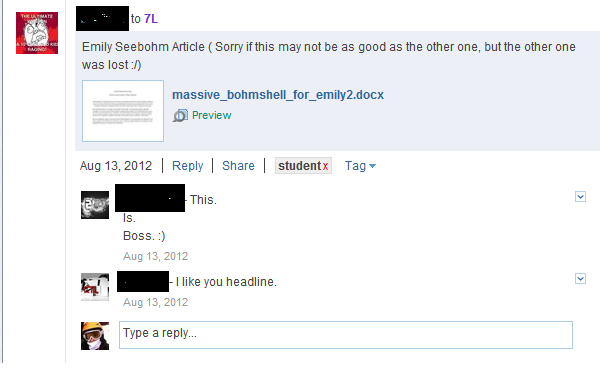
Students sharing and commenting on each other's work on Edmodo

Students sharing and commenting on each other’s work on Edmodo

Students sharing and commenting on each other's work on Edmodo

Students sharing and commenting on each other’s work on Edmodo

For me this year, Edmodo has transformed from a free alternative to a learning management system to a tool for enhancing a learning community. It is an online space that allows my students to learn from each other beyond the four walls of the classroom and beyond 9am to 3pm. The Year 7 Edmodo group is a much more dynamic and successful learning community than my previous Year 11 group. Why?

Just do a search in Google for creating a successful online learning community and most sites will give you very similar tips.

  • An online community is like a traditional community, built on shared qualities, characteristics and purpose.
  • A successful online learning community must create value for its members. The online community must be worthwhile for its members to visit regularly.
  • Individuals must be supported and empowered to share their knowledge, information and user-created content. A successful learning community must have a majority of members sharing ideas and content that is of value to that community.

So how did I ensure the above three features of the Year 7 Edmodo group this year?

Shared qualities, characteristics and purpose

Year 7s knew from the start of the year that the group was for them to share their learning. While they also post their homework on there too, one of the first things I did was to have them share a summary of a news item of their interest (most reported on NRL pre-season news) and reply to another student’s post with something they have learnt from that student’s posts. Questions asked by students were answered very quickly by me, which assured students that Edmodo was a worthy tool for communication. This set up a sense of shared purpose for the Edmodo group very early on.

Creating value

One of the ways of creating value in an online community is to allow users to personalise the space. For my Year 11 physics group, I gave them the Edmodo group code and went from there. I didn’t spend time to let them set up their profiles and change their profile pictures. For Year 7s we spent an hour setting up their Edmodo accounts, filling out their Edmodo profiles and choosing an avatar that most represented them. This was done in the second lesson of the school year. So straight away Year 7s was given an opportunity to value Edmodo; this opportunity was not given to Year 11s.

Support and empowerment

Year 7s often post things up that are not 100% related to our school work. Posts like personal art projects they have done, their successes in weekend sport, their views of internet censorship and the death of Niel Armstrong. I actually don’t know why my Year 7s feel empowered to share things they have created or news they think are worthy for their classmates to know on Edmodo. This started very early on in Term 1. Perhaps because their early activities on Edmodo was all to do with sharing their personal interest projects and news. Perhaps in our face to face classes we emphasise on sharing our learninh artefacts. Whatever the impetus is, I hope it stays there because it is one of the strongest driving forces of our learning community.

Note that the above features of successful online learning communities are all related to how people relate and interact with each other and how they emotionally connect with the online space. How come this is rarely discussed in professional dialogue associated with such online tools? I think teachers often do misjustice to educational social networking tools like Edmodo when we promote it to other teachers in professional learning or in conversation when all we talk about are how Edmodo allows students to complete self-marking quizzes. These are all excellent tools for learning but rarely are our conversations and professional learning about the dynamics of human relationships in such online environments. Yet it is these intricate dynamics of human relationships and interactions that would make or break an online learning community. Unless these are made explicit for teachers about to make the online learning journey, we are almost setting them up for failure. It doesn’t matter whether teachers are using Edmodo, Moodle or any other online learning community tool, we must talk about human relationships and interactions.

Learning with mobile phones

This sign is the type of sign that many schools have in relation to mobile phone use by students at school.

a sign showing mobile phones are banned

While mobile phones can cause distraction to students’ learning, they can also be a powerful learning tool, and I’m not talking about using educational apps or educational apps. Mobile phones can be an extremely powerful tool for students to demonstrate higher order thinking skills, which a colleague and I presented at the NSW Secondary Principal’s Council conference.

Mobile phones are a high quality camera

A lot of students now have a smart phone (iPhone, Android, Windows phone). These are also high quality cameras for still photos and video cameras. Never in the history of education can a teacher walk into a classroom and have almost a 1:1 ratio of high quality cameras at students’ fingertips to create learning artefacts.

As an example, my Year 7s were learning about magnetic forces last week. Typically such a lesson will involve a practical activity with bar magnets, followed by some comprehension questions. Instead of getting my year 7s to answer textbook-style questions to show that they understood magnetic forces (which they did for homework), they made a photostory to show what they have learnt. They had to take photos of their experiment and insert captions to show the properties of magnetic fields. They used their mobile phones to capture the photos and used Windows Live Movie Maker to create the photostory.

This teacher-led explanation, the practical activity and the creation of the photostory was completed in under 2 hours.The photostory isn’t intended to be a high end production. The photostory acts as a quick creation for students to show their understanding. One of the photostories is shown below. Minimal editing was involved and the photostory was used as a stimulus for a class discussion on magnetic forces.

What will your students do with their mobile phones?

Can you see the thousands of dollars?

My year 7 has had laptops now for a few weeks. The class received 12 laptops, which is a costly investment. A colleague once wisely said if that much money was spent you should be able to walk into a classroom/school and notice a difference. You should be able to visibly see that investment’s impact on student learning. So I asked myself exactly that question – Is the learning different in my classroom now? Is the learning better in my classroom now?

I’d like to say yes, and here’s my evidence:
-Students now use their laptops in small groups to demonstrate their understanding, often with higher order thinking skills. Today we explored the properties of magnets. Instead of doing the prac activity from the textbook and writing a prac report, students made a photo story to explain to other year 7s the magnetic properties they have discovered. This took 2 hours. Minimal editing was involved as I wanted the students to focus on the explanation of science, not on fancy video transitions.

-Laptops are used to differentiate learning. Year 7s have been learning about area of composite shapes and expressing area and perimeter through algebraic expressions. Students had to self assess whether they needed more practice in composite shapes or were ready to move onto algebra. Students who selected to refine their skills in composite shapes worked on a self-marking quiz on the laptops while the rest had small group instruction on algebra.

These are just 2 activities where laptops have enhanced learning. When you walk into my classroom, you can see, hear and feel those thousands of dollars making an impact.

Are your thousands of dollars of investments visibly making a difference?

20120821-222310.jpg

20120821-222357.jpg

Saying goodbye to the computer room

On Friday I said goodbye to the computer room. The computer room that I have been hogging for at least 4 hours a week since the start of the year. I have spent so much effort making sure I made books as advanced as possible for that computer room so that my Year 7 integrated curriculum class can use it. I felt guilty every time I did that. My students needed to use it, but I also felt as though I was removing a shared resource from other students and teachers. Having taught in a 1:1 learning environment for the past 3 years, teaching only Year 7s this year, where they were not entitled to their own laptops as part of the Digital Education Revolution, really killed me. I was so used to designing learning using collaborative spaces like Edmodo that it felt like all that was taken away from me in the first two terms this year.

However on Friday August 3, my Year 7s received a class set of laptops as part of our school’s middle years strategy and our connected learning strategy. Year 7s received 12 Lenovo Thinkpads, which makes the official laptop to student ratio in my class 1:2.5. The real ratio is 1:2 as some students bring their own devices.

For some people I have talked to, they found it strange that I’m so excited about getting 12 laptops when a computer room offers 20 computers. I would rather have 12 laptops in the classroom than 20 desktop computers that are bolted in a room because:

  • For my Year 7 integrated curriculum class, we used computers mainly for project based learning. So far we have made infographics, science videos and built Parthenons in Minecraft just to name a few. For these projects, students are required to do a mixture of activities that require technology and activities do not require technology. A lot of the times, some students are on computers and other students are working in another area as they are discussing their project or that part of their project does not require a computer. My students will choose the tools that best fit their learning needs at a particular time. Laptops in the classroom do this so much better than computer rooms.

  • Computer rooms are often restrictive learning spaces. They are often built where the only thing you can do is go on computers for the entire lesson. We have 4 computer rooms at the school and I only ever booked one computer room. That’s because this particular room allowed students to spill out into an adjacent area with couches where they can have discussions about their learning rather than being squashed in front of a computer for hours at a time.

  • Having laptops in the classroom allows more flexibility in learning design. Laptops allow the learning to drive the need for technology, not the other way around. When laptops are in the classroom you can use them for lengthy periods of time or in short bursts, depending on the learning need. When computers are fixed in computer rooms, you need to make sure that the whole lesson requires the use of computers so that you’re not wasting the computer room as a resource. You don’t want to book into a computer room if the learning only requires students to be using computers for 15 minutes out of a 60 minute lesson.
  • Laptops in the classroom allows anytime, anywhere learning. If there is a need, my Year 7s can jump on a laptop to go online, to watch an animation that explains a concept, etc. My Year 7s can take their laptops anywhere in the school. They can use it to connect their data loggers to measure features of the environment and they can enter data into a spreadsheet when we are using an outdoor space. If they need to go to a quiet space to record audio, they can take their laptops to that quiet space rather than trying to do so in a computer room with 29 other students. Laptops not only allow learning to drive the need for technology, but it also allows learning to drive the need for a particular style of learning space.

Finally I really hate the concept of computer rooms. To me it’s like going into a calculator room to use a calculator, or a pen room to use a pen. Technology is part of our daily lives now that we shouldn’t have to move to a specialised space to use it. Unless you are doing some hard core 3D animation that requires a high end computer, there should be no need to move to a computer room.

So on Friday my Year 7s and I waved goodbye to the computer room. I have been waiting for that moment for the whole year.