Level up! Games, resilience & innovation

I have just returned from a five-day trip to Adelaide where I attended the Global Emerging Leaders Summit (GELS) and the Australian Council for Educational Leaders conference. The overall arching theme was “change” and “innovation”. One thing that really stuck out at me from both conferences was the need for resilience. Students need to be resilient in order to be innovative in a rapidly-changing world. To order to innovate, you need to be able to fail, fail multiple times, and get back up to reflect and improve. In one of the conference sessions, the principal from North Sydney Girls High School spoke about how her school was developing students’ resilience as a foundation for them to think outside the square.

But what about the teachers and their resilience? In GELS there was lots of talk about many teachers being skeptical about change; that they don’t want to prototype or try anything new when clearly what they are currently doing is not working or is contrary to research on best practice. While it is important to build students’ resilience, I think it is equally as important to build teachers’ resilience.  I think every teacher has had this experience – they come up with a brilliant lesson or activity to engage their students and improve their learning, but when they implement it, it just doesn’t go right. Sometimes it even fails dismally. I have had this many, many times. But I look back at the reasons why it failed, tweak the idea and try again. Many teachers do this, but  many teachers would simply give up and go back to their previous way. Some teachers not only give up but become increasingly cynical towards new ideas.

So how can we make teachers more resilient in order to lead to innovation? I think games based learning will have a role to play here, for students and teachers. No one is ever successful at a game the first time they play. And no one gives up on a game the first time they fail. (Yes people do rage quit, but that is usually after many attempts.). When you die in a game, you re-start and try again. Most of the time you work out what killed you the previous time so you won’t do that again and try something different. Most of the time you work out patterns in things like how the enemies come out at you so you devise more efficient ways of wiping them out. Imagine what our schools and classrooms would be like if all students and teachers did this? There is research that shows playing games can build resilience of improve “self-concept”. Susan Main and John O’Rourke showed that when students used hand-held console games to learn maths, their confidence in themselves increased and their achievements increased, signficantly more than the control group of students who did not use games. (This article is in the Australian Journal of Teacher Education, vol 36 (2), pp. 42-55)

So video games build your resilience, but it is unrealistic to expect a student or teacher to play a game and suddenly become resilient all other aspects of their lives. We need to look at elements of video games that build players’ resilience. I think there are three key elements.

Element 1 –  You have a guide

In games this is usually a fairy, a dog, some sort of partner like a fellow detective, or a third-person voice that speaks to you. This guide doesn’t know everything, but they are there to give you hints and suggestions when you feel stuck. And that’s why you try different things to pass a level. A good example of this is the fairy Navi in the Legend of Zelda series.

navi and link from legend of zelda

Element 2 – A supportive community

When the fairy in the game doesn’t give you anything useful and you’re still stuck, you jump on the internet to ask other gamers. The gaming community is a supportive network that would tell you what you’ve done wrong and give you suggestions to improve.

Element 3 – Setting you up for success

red mushroom power up  star power up

Games place strategic “power-ups” and objects to make sure you can be successful in your quest. Games do not set up for players to fail. Games make sure you can work out how to win. This can be placing extra “health packs” in a space just before you go fight a boss, or the game reminding you that perhaps it’s a good idea to visit the markets to stock up on health supplies before embarking on your next quest.  The Child and Youth Health website actually makes an analogy between video games and resilience, citing that you need “power-ups” to keep you going in life when you face obstacles.

Teachers and students need these three elements in gaming to be replicated in their real worlds. We all need a Navi to guide us. We all need a supportive community like an online professional learning network where we can share our expertise but also ask for guidance from others. We also need power-ups (resources, leadership, etc) to make sure we are set up to succeed.

So grab your Xbox, Playstation and Wii and play something as the first step. Imagine how innovative and engaging our classrooms can be …

Using Spore for evolution

My next topic with my year 10 science class is evolution. Once again, I’d like to embed games based learning into the topic. I’ve been exploring possible games for evolution a while now and have decided on Spore.

spore game cover

Spore is a multi-genre, single-player god game developed by Maxis and designed by Will Wright, the same guys who are responsible for The Sims. Spore allows a player to control the development of a species from a single-cell, microscopic organism through to its evolution as a social tribe, which eventually evolves to an intergalactic society. There are 5 stages in the game: cell stage, creature stage, tribal stage, civilization stage and space stage.

I don’t want my students to learn evolution from Spore because there’s definitely some bad science in it. While there are some bits that are similar to evolution, Spore perpetuates some very common misconceptions about evolution. For example it presents evolution as individual organisms changing. There are scenes where you see your creature physically transform into another species, which is not what evolution is about. Evolution is about a species changing as a whole due to individuals surviving or dying based on whether they have adaptations to the environment. In evolution, adaptations come about randomly. However in Spore, the player gets to choose what characteristics their Spore creature has. For example, when you realise that there are many creatures trying to eat you in the creature stage, you’ll put more defences or stronger legs on your creature so it can defend itself better. This is more like intelligent design, not evolution.

So if Spore doesn’t have good science, why do I want my students to play it?

Looking at the higher levels of Bloom’s taxonomy, being able to critique and evaluate are near the top. What I want my students to do is to play Spore then make a game review to critique the scientific accuracy of the game. To do this well they will need to understand evolution well and overcome the common misconceptions. I’m going to set a task where they need to work in groups to play the game, learn about evolution from other resources and make a video game review on the scientific accuracy of Spore.

I’m going to start this in 2 weeks. Any feedback or comments would be greatly appreciated.

Playing games, making games

My year 7 science class has just finished the topic Forces. There is a week left in this term and I didn’t want to start the next topic so I decided to do revision with them. Students often ask me for revision lessons, but they are always disengaged in them. Revision lessons often involve students doing repetitive questions that do not require them to engage in higher-order thinking. So I decided to have my year 7s play games and make games to revise. I’m also trying to have my lesson activities tap more into the higher levels of Bloom’s digital taxonomy.

Bloom's digital taxonomy

I used the website classtools.net for the year 7s to play the games and make the games. Today we revised scientific investigations. We started with an easy worksheet, Scientific Investigations, which was followed by the class playing the wordshoot game on classtools.net based on the questions on the worksheet.

On the next lesson the students will work in pairs to make their own game on a topic we’ve done this year. They will use this planning sheet, Game Plan, to devise the questions and answers then make the game on classtools.net. They will then evaluate each others’ games on our class blog to justify which game they liked the best and why.

Hopefully this activity will make my year 7s use more of their higher-order thinking skills. Creating something fun to revise has to be much better for them than doing boring worksheets.

QR codes in science

Rocks can be a very boring topic. Teaching the rock cycle and getting students to engage with rocks can be difficult. I’ve been exploring the use of QR codes in the classroom lately and have come up with this idea to make looking at rocks a bit more fun.

This activity requires the Common Rocks Reference app and a QR reader app on an iPod, iPhone or iPad.

Here’s a brief outline of the activity:

  • Organise samples of  basalt, granite, gabbro, gneiss, phyllite, schist, slate, conglomerate, limestone and shale and place them around the classroom. Label the samples 1, 2, 3, etc.
  • Place the corresponding QR code card next to each sample.
  • Students can work in small groups to rotate through each sample. They can read the clues under the QR code and use the Rocks app to guess what rock it is then scan the QR code to reveal the answer.
image of QR codes for different types of rocks
This activity can be turned into a “Who is the best geologist” game and have groups of students competing against each other to see who can identify the most rocks correctly.
A more detailed version of the activity with all the QR codes for the rocks can be downloaded here, QRcodes_rocks.
What do you think of this activity? Feel free to comment and make suggestions. 🙂

Mobile gaming in school

Primary-secondary transition … when Year 6 students spend a day at high school to see what it’s like before attending the year after. This usually involves a tour of the school. “Here is the canteen. Here are the toilets. This is the front office.” Kids become bored in about 5 minutes.

So how can we make it more engaging? In a way that is fun and will allow kids to actually remember the places?

Turn it into a game!

I’m exploring at the moment is mobile gaming. Instead of students being shown around the school and taking in information passively, a group of students and I are planning to have small groups of Year 6s as players completing quests with the use of iPods and QR codes.

I’m leading a group of students on making a mobile game in Aris for this school tour activity. The video below shows the potential of Aris in geolocation activities:

The group consists of 6 students ranging from Year 9 to 11. There are three teams within the group: (1) Narrative writers; (2) World designers; and (3) Media designers. The narrative writers have constructed a draft narrative, which involves elements of a typical day in high school – what to do at recess and lunch, locations of staffrooms and locations of other significant places at the school such as the library and sporting fields. From this, the group has created 9 quests.

The first quest they have constructed is the Social Quest, which involves unlocking the Social Badge. The narrative is:

The bell has gone for recess. You have 30 minutes to visit the toilets, buy a nutritious meal from the canteen that will give you energy to last you till lunch and place your rubbish in the bin in the quadrangle.

The students have made a plaque in Aris which contains the quest’s instructions. The plaque will be revealed on players’ iPods when they scan a QR code. QR codes will also be placed in the toilets, canteen and quadrangle. The QR codes in each place will contain the following information:

-Toilets – You have used toilet paper to dry your hands. To be a safe, respectful learner you’ll need to place the toilet paper in the bin.

-Canteen – There will be multiple QR codes with picture of different food underneath them for students to choose the most nutritious food

-Quadrangle –  To be a safe, respectful learner you’ll l need to put your rubbish in the bin

Players are awarded items when they scan each correct QR code. When they have collected all the items, a virtual character called “Social Guardian” will appear to say they have unlocked the social badge and give instructions for the next quest.

The media designers have constructed the social badge while the world designers have placed all the information onto Aris.

social badge

aris screenshot

This is still work in progress so watch this space for updates 🙂


Xbox Kinect in the classroom

hurdles in kinect sports

Last week I bought a Kinect for the science faculty and embedded it into a Year 7 science class. If you search for Kinect in the classroom in Google, you’d find a large number of teachers already using Kinect in the classroom. However, most of them have integrated the Kinect in complex ways that require hacking the Kinect or SDK coding. I wanted to embed the Kinect as part of a learning activity that all teachers can implement in the classroom without feeling intimidated by.

My Year 7 class is doing a unit of work on forces at the moment. In the unit of work, they do an activity to measure average speed of moving objects. Traditionally I would bring students outside the classroom to run and walk a certain distance and measure the time taken to calculate average speed. I have also used slot cars in similar ways. Now that I’ve got the Kinect, I wanted to device an activity that allowed students to do a fun activity that won’t usually be possible in the classroom.

I decided to get my Year 7s to do hurdles in Kinect Sports. In pairs, students ran a 100 m race in hurdles and Kinect Sports measured their time. Students then calculated the average speed of each student and constructed a table to show the results.

My Year 7s usually need a lot of support in learning activities. With Kinect Sports, I had a student volunteer familiar with Kinect to demonstrate the game and all students knew what to do without my help at all. They were also highly engaged and were very motivated to calculate average speeds for each student to find out who is the fastest. The students completed the speed calculations faster than I expected. In a one hour period, this is what the class achieved the following:

-Completed a quick quiz

-Brainstormed why distance, time and speed were important measurements in an object’s movement due to forces

-Students constructed a table to record the results from Kinect Sports

-Each student ran 100 m hurdles in Kinect Sports

-Average speed calculations were completed by students

-Furniture was rearranged to its original seating plan

-Lesson was summarised

It might not sound much, but this was a great achievement from this class!

While this activity may not be the most creative or complex way to integrate Kinect as a teaching and learning tool, it is an activity that can ease many teachers in integrating gaming consoles into the classroom It is a numeracy-based activity that has applications in many other subject areas. This activity was shared with other teachers at my school in our weekly Xbox professional learning sessions.

Using Google Apps to work smarter

Our school has a strong digital culture both in teaching and learning and in whole school processes. For example roll marking and many administration processes are electronic. Using technology in such day-to-day practices allow teachers to be comfortable and familiar with technology, which transcends into the classroom.

I was recently given the opportunity to move some of the school’s administration processes online. These administration processes include the applications for staff to attend professional learning and applications for excursions and variations to routine.

Prior to this, we were using interactive pdf forms for these applications. All forms were placed in a pdf portfolio in a shared drive at school. Teachers had to complete the relevant form, save the form from the portfolio and attach it to an email and send it to the designated staff member who processes the application. These processes were a critical part of the school’s journey in creating a digital culture. It allowed the school to move from paper-based processes to electronic processes. However the pdf forms had several issues, including:

  • Staff saving the whole pdf portfolio instead of just the relevant form.
  • Only one member of staff being able to access the forms’ information. This staff member would then have to pass on the information to other staff members that required this information, such as the person responsible for organising casual teachers to cover classes.
  • The forms taking up storage space in emails
  • The lack of a system to track which forms had been processed, especially in times when multiple people processed the forms

Basically we wanted a system where there were simple forms that staff can fill out and click submit (without the need to save or email). We wanted a system where multiple organisers can access the same information and track progress in processing the information.

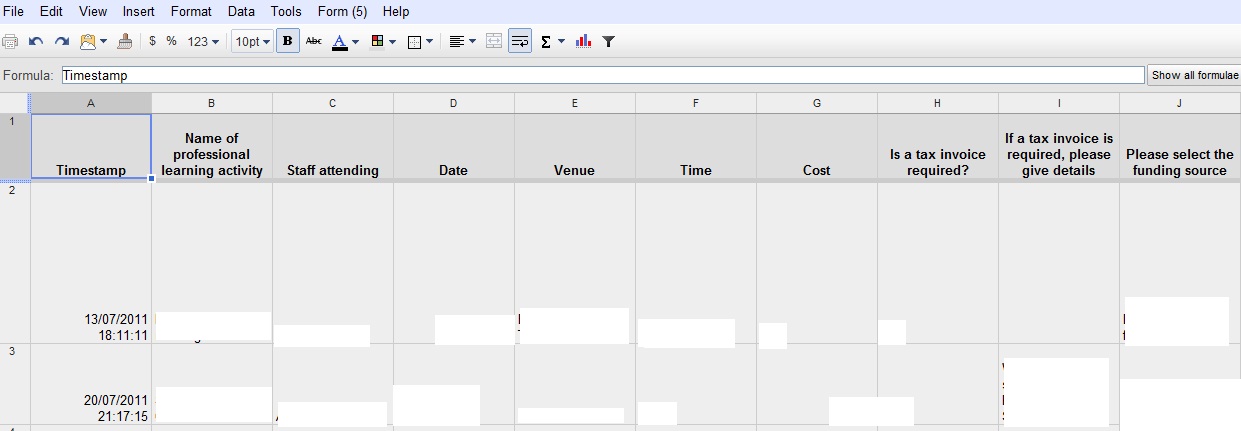
I was lucky enough to be trusted with the responsibility in exploring a tool to do this. I decided to use Google Documents and Google Sites. I made forms via Google Documents for applications for staff professional learning and applications for excursions and variations to routine. With these forms, staff only have to fill in the relevant information and click on Submit. Designated staff members with administration access will see the forms’ responses in a spreadsheet. The main advantage is that there can multiple designated staff members working on the same document (eg. the person in charge of placing events on the school calendar and the person in charge of casual relief can work collaboratively on the same spreadsheet to track who has done what. The spreadsheet can also be downloaded as an Excel file to be backed up if required.

screenshot of online form

Screenshot of online form for application for professional learning made in Google Documents


screenshot of spreadsheet in google

screenshot of spreadsheet in google with responses from online forms

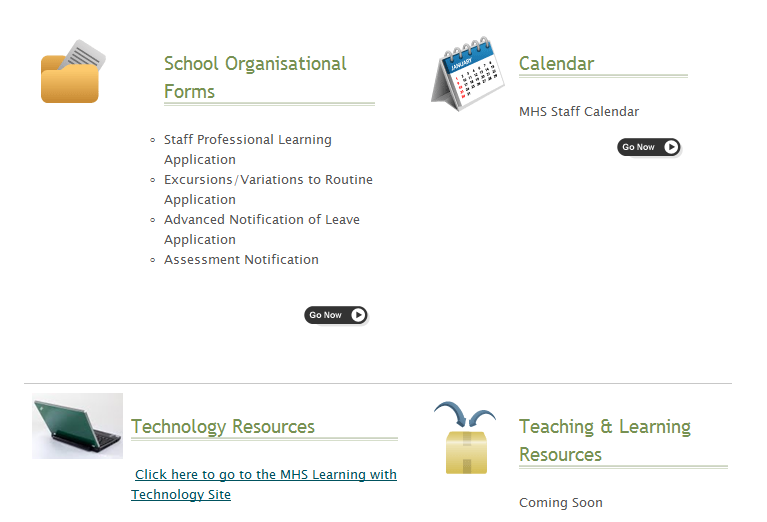
The next step is to find a space to hold all the forms. I decided to set up a staff intranet via Google Sites. I was also able to merge the school’s calendar and link in the school’s previously set up technology blog into the intranet. So now there is one online space for all administration processes that can be accessed at school, home and anywhere else with internet access. It can also be accessed by mobile devices.

intranet screenshot

screenshot of the staff intranet on google sitesscreenshot of a page in the staff intranet where all school admin forms are placed

Hopefully this will continue our school’s journey in creating and maintaining a digital culture. In the end, it’s about streamlining processes, centralising resources and working smarter.

The best part is Google Documents and Google Sites are free!