School holidays – the perfect time to learn from other schools

“I don’t know why you would even think about going near any school while you’re on holidays”

This is what one teacher said to me when I told them that I was going to spend half a day visiting a school during the school holidays. At the moment it is the Term 3 school holidays in New South Wales, Australia. For me teaching isn’t something I can switch off. Don’t get me wrong, I still have my down time and I think this down time is important for all teachers’ wellbeing. But I personally like to take advantage of the school holidays and use the time to visit schools that are outside the NSW public education system. Especially schools that are drastically different to the one I currently teach in because what I’ve learnt is that almost every school faces a similar set of challenges whether it is student engagement, student wellbeing or finding ways to develop students higher-order thinking. I find that when I visit schools that have different circumstances than my own, I am exposed to different solutions that I can adapt to my own school and my own classes.

Over the past two years I have been able to visit schools outside of New South Wales and outside of Australia, and they have been some of the best professional learning I have ever had. While some of these visits were done during term time, most visits were done during school holidays. Here are some of the schools I’ve visited and what I’ve learnt from them.

During my time with Microsoft’s Partners in Learning team in 2012, I was able to travel to Auckland, New Zealand and visit Ferguson Intermediate School and Howick College. These two schools kick-started my journey and my faculty’s journey into using the Structured Observed Learning Outcomes (SOLO) framework, learning intentions and success criteria to design learning for the new science syllabus for the Australian Curriculum. Howick College is also where I saw the fantastic Julia Breen and got ideas from her on how to use green screens in student-produced videos.

I took a week of without pay from school in December 2012 and travelled to London and visited ACS International School, Egham. I ‘met’ the Principal of ACS International School, Egham online via LinkedIn and he was kind enough to take time out to show me his school for half a day. I was also privileged enough to speak to their Head of Science and observed a part of a middle school science lesson. During this visit I learnt more about the International Baccalaureate Middle Years Program and how technology was integrated into the school’s middle years science program.

Just last week I was able to visit two schools in Canberra – Brindabella Christian College and Dickson College. I was able to further connect with two passionate educators who are part of my online professional learning network on Twitter, Melanie Spencer and Betty Chau. From these schools I took away ideas for learning space design, how to drive change and how to further develop the digital leaders team at my own school.

Visiting other schools is one of the best professional learning that I undertake. If you’re a teacher and you have some spare time in the school holidays, ask another school if you can visit them and then return the favour to them 🙂

Incidentally I am planning to travel to Tokyo, Japan in the April school holidays in 2014. Would love any suggestions of schools in Tokyo that I can visit.

Using video as evidence of learning

Today my Year 8s used lollies and toothpicks to model elements, molecules, compounds and mixtures. This isn’t anything new. Lots of teachers and students have done this before. However, I decide to allow students to film themselves explaining how the lolly models they made represent elements, molecules, compounds and mixtures as evidence of learning. For one group, I decided to record a question-and-answer conversation on my iPad.

The video showed that this student understood to a certain extent how particles are arranged in elements, molecules, compounds and mixtures. The student did accurately use the lollies for this, but upon questioning, she was confused about how many different types of particles made up her lolly models of compounds and mixtures.

I’d like this type of evidence of learning to be prominent in schools. As a system I think we rely too heavily on written exams and assignments to elicit student understanding of concepts. Having videos such as the one shown above is much more powerful to give feedback to students and to use as evidence of learning. Eventually I’d like each of teacher in my faculty to a collection of videos like this for professional discussions on our students’ learning.

BYOD – the first steps

So my school has decided to journey down the BYOD path. This is for several reasons, including students already bringing in their own devices (not just their own smartphones but quite a few students bring in their own laptops and tablets) and asking for them to be connected to the school WiFi and wanting to continue technology-rich learning post DER (DER stands for Digital Education Revolution, an Australian government initiative that gave Year 9 students their own laptops. The funding for this has ended.)

Several teachers have asked for a blog post on our BYOD journey so far so here it is …

Before we jumped on the BYOD bandwagon, we wanted to know what students thought of this. This involved chatting to students to explain what BYOD is and whether they would bring the devices they already at home to school. We put the feelers out to see what students, parents and teachers think. The students we spoke to in these informal discussions were very supportive of the idea of BYOD and wanted to be involved in the school’s exploration of possibly implementing BYOD.

At the same time, we also looked at the literature review into BYOD and did some further research, which included using the insights from Mal Lee’s Bring Your Own Technology. Once we had a good grasp of the educational research and grounding for BYOD, looked into other school’s journey into BYOD, looked at what we already knew about our school community, we decided to propose a BYOD model where students bring in whichever laptops or tablets they wanted as long as the devices connected to the school WiFi and had certain basic software and apps installed. We also seeked feedback from people with a bit more expertise than we did at BYOD (hat tip to Pip Cleaves and Stephen Turner in particular).

So at this stage, the senior executive team was happy, the students we spoke to were happy and the teachers we seeked out for the BYOD trial was happy with the model. At this stage, our Community Liaison Officer and P&C gave their support to the model and was able to help us explain our BYOD proposal to parents. This launched us into mass data collection stage. We had a fair idea of what devices our students already owned and the challenges that will face our students’ families if BYOD is implemented, but wanted to be 100% sure and to hear as many voices and ideas as possible.

We surveyed Year 7 and 8 students and their parents. From the student survey data, we chose a group of students that held a diverse range of views towards BYOD for student focus groups, which is also acting as a student advisory group for BYOD. The focus groups enabled students to explain their concerns towards BYOD in detail and as a group come up with solutions to address their concerns.

From all the data collection and consultation with the school community, there was overwhelming support for BYOD and the reasons cited include:

-students already being familiar with their own devices
-having access to their own devices in class caves time as they longer need to move from their regular classrooms to a computer room
-bringing their own devices to school will make learning more fluid between school and home
-technology being a part of students everyday lives

The main concerns that were raised were:
-how equity issues will be addressed
-safety and storage of devices
-digital citizenship

The main lessons we’ve learnt from our BYOD journey so far is to involve the school community as much as possible. This sounds obvious but from our experience it is the students and parents who have come up with the best solutions to address challenges of BYOD.

Our next step is to work with teachers and students on the next challenges, which includes leading a classroom with multi-platform devices and learning design that will best utilise students’ devices.

Professional learning – a journey

Many faculties at my school purchased iPads to be used as student devices this term. Our aim is to use these iPads in combination with the other ICT tools we have already (1:1 laptops, interactive whiteboards, flip cams, etc) to further move into 21st century leaning.

I am now in the process of organising teacher professional learning to make sure that teachers can maximise the learning benefits of these iPads. To do this I have been browsing through many blogs and websites that detail how others have done this. Many of these blogs and sites contain information like “102 ways to use your iPad in the classroom”. In the professional learning I have attended for iPads, they have also mainly focused on apps. Now that’s all well and good as teachers need to know what apps are out there, which apps have been tried by teachers and how they have used those apps in their classrooms. According to this article, there are four stages to teachers’ integration of technology in teaching learning:

Stage 1  – Preliterate end users – Teachers with minimal experience with the technology – The challenge here is to help these teachers see the benefits of technology in making their classroom instruction and administration easier

Stage 2 – Software technicians – Teachers who have used apps, software and/or the piece of technology for personal use

Stage 3 – Electronic traditionalists – Teachers proficient in using technology to extend traditional classroom instruction such as electronic worksheets and drill and practice quizzes

Stage 4 – Techno-constructivists – Teachers who utilises technology to allow students to construct their own understanding, create products and solve problems

At the moment I think I do stage 1, 2 and 3 quite well when I design professional learning for other teachers. However stage 4 is much trickier. How can I design professional learning that will help teachers on a journey to become techno-constructivists? It will require teachers to confront and reflect on their perspectives of how students learn, which are framed by many previous experiences and assumptions.

How would you approach this? Have you done this before? Share your ideas and thoughts 🙂

You don’t create groups on Edmodo. You create learning communities.

You don’t create groups on Edmodo, you create learning communities

I have been using Edmodo as an online learning tool for a little over 1.5 years now. Back at the beginning, I viewed Edmodo as an easy way to post content for my students online, for students to submit their work online and for me to send my students urgent important messages outside of school hours. The way I used it was very one way – teacher to student. The first Edmodo group I set up was for a Year 11 Physics class. When I analyse that page, almost every single post was made by me. Most of these posts have no replies. There were a small number of posts made by students, which were questions directed at me as a teacher and I answered them. This group wasn’t a learning community. It was just a website that had information posted by me.

This year I have been using Edmodo with my Year 7 Integrated Curriculum class, which I teach for English, Maths, Science, Geography and History. Our Edmodo group page looks very different to the year 11 page. Firstly there are heaps of posts, probably 5 times as many posts as the Year 11 Physics group. And most importantly, a significant number of those posts are made by students.

I went through the Year 7 Edmodo page and categorised all posts made in August 2012 and here are the stats:

  • There were 71 posts during this month
  • 46 out of 71 posts were by me
  • 25 out of 71 posts were by students
  • 62 out of these 71 posts involved a discussion
    • This means that these 62 posts had more than one reply comment. These reply comments included students commenting on each other’s work, answering each other’s questions or holding a discussion that was of interest to them
Students sharing and commenting on each other's work on Edmodo

Students sharing and commenting on each other’s work on Edmodo
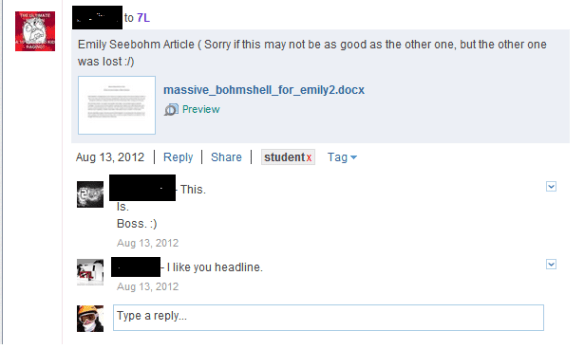
Students sharing and commenting on each other's work on Edmodo

Students sharing and commenting on each other’s work on Edmodo

For me this year, Edmodo has transformed from a free alternative to a learning management system to a tool for enhancing a learning community. It is an online space that allows my students to learn from each other beyond the four walls of the classroom and beyond 9am to 3pm. The Year 7 Edmodo group is a much more dynamic and successful learning community than my previous Year 11 group. Why?

Just do a search in Google for creating a successful online learning community and most sites will give you very similar tips.

  • An online community is like a traditional community, built on shared qualities, characteristics and purpose.
  • A successful online learning community must create value for its members. The online community must be worthwhile for its members to visit regularly.
  • Individuals must be supported and empowered to share their knowledge, information and user-created content. A successful learning community must have a majority of members sharing ideas and content that is of value to that community.

So how did I ensure the above three features of the Year 7 Edmodo group this year?

Shared qualities, characteristics and purpose

Year 7s knew from the start of the year that the group was for them to share their learning. While they also post their homework on there too, one of the first things I did was to have them share a summary of a news item of their interest (most reported on NRL pre-season news) and reply to another student’s post with something they have learnt from that student’s posts. Questions asked by students were answered very quickly by me, which assured students that Edmodo was a worthy tool for communication. This set up a sense of shared purpose for the Edmodo group very early on.

Creating value

One of the ways of creating value in an online community is to allow users to personalise the space. For my Year 11 physics group, I gave them the Edmodo group code and went from there. I didn’t spend time to let them set up their profiles and change their profile pictures. For Year 7s we spent an hour setting up their Edmodo accounts, filling out their Edmodo profiles and choosing an avatar that most represented them. This was done in the second lesson of the school year. So straight away Year 7s was given an opportunity to value Edmodo; this opportunity was not given to Year 11s.

Support and empowerment

Year 7s often post things up that are not 100% related to our school work. Posts like personal art projects they have done, their successes in weekend sport, their views of internet censorship and the death of Niel Armstrong. I actually don’t know why my Year 7s feel empowered to share things they have created or news they think are worthy for their classmates to know on Edmodo. This started very early on in Term 1. Perhaps because their early activities on Edmodo was all to do with sharing their personal interest projects and news. Perhaps in our face to face classes we emphasise on sharing our learninh artefacts. Whatever the impetus is, I hope it stays there because it is one of the strongest driving forces of our learning community.

Note that the above features of successful online learning communities are all related to how people relate and interact with each other and how they emotionally connect with the online space. How come this is rarely discussed in professional dialogue associated with such online tools? I think teachers often do misjustice to educational social networking tools like Edmodo when we promote it to other teachers in professional learning or in conversation when all we talk about are how Edmodo allows students to complete self-marking quizzes. These are all excellent tools for learning but rarely are our conversations and professional learning about the dynamics of human relationships in such online environments. Yet it is these intricate dynamics of human relationships and interactions that would make or break an online learning community. Unless these are made explicit for teachers about to make the online learning journey, we are almost setting them up for failure. It doesn’t matter whether teachers are using Edmodo, Moodle or any other online learning community tool, we must talk about human relationships and interactions.

Learning with mobile phones

This sign is the type of sign that many schools have in relation to mobile phone use by students at school.

a sign showing mobile phones are banned

While mobile phones can cause distraction to students’ learning, they can also be a powerful learning tool, and I’m not talking about using educational apps or educational apps. Mobile phones can be an extremely powerful tool for students to demonstrate higher order thinking skills, which a colleague and I presented at the NSW Secondary Principal’s Council conference.

Mobile phones are a high quality camera

A lot of students now have a smart phone (iPhone, Android, Windows phone). These are also high quality cameras for still photos and video cameras. Never in the history of education can a teacher walk into a classroom and have almost a 1:1 ratio of high quality cameras at students’ fingertips to create learning artefacts.

As an example, my Year 7s were learning about magnetic forces last week. Typically such a lesson will involve a practical activity with bar magnets, followed by some comprehension questions. Instead of getting my year 7s to answer textbook-style questions to show that they understood magnetic forces (which they did for homework), they made a photostory to show what they have learnt. They had to take photos of their experiment and insert captions to show the properties of magnetic fields. They used their mobile phones to capture the photos and used Windows Live Movie Maker to create the photostory.

This teacher-led explanation, the practical activity and the creation of the photostory was completed in under 2 hours.The photostory isn’t intended to be a high end production. The photostory acts as a quick creation for students to show their understanding. One of the photostories is shown below. Minimal editing was involved and the photostory was used as a stimulus for a class discussion on magnetic forces.

What will your students do with their mobile phones?

Saying goodbye to the computer room

On Friday I said goodbye to the computer room. The computer room that I have been hogging for at least 4 hours a week since the start of the year. I have spent so much effort making sure I made books as advanced as possible for that computer room so that my Year 7 integrated curriculum class can use it. I felt guilty every time I did that. My students needed to use it, but I also felt as though I was removing a shared resource from other students and teachers. Having taught in a 1:1 learning environment for the past 3 years, teaching only Year 7s this year, where they were not entitled to their own laptops as part of the Digital Education Revolution, really killed me. I was so used to designing learning using collaborative spaces like Edmodo that it felt like all that was taken away from me in the first two terms this year.

However on Friday August 3, my Year 7s received a class set of laptops as part of our school’s middle years strategy and our connected learning strategy. Year 7s received 12 Lenovo Thinkpads, which makes the official laptop to student ratio in my class 1:2.5. The real ratio is 1:2 as some students bring their own devices.

For some people I have talked to, they found it strange that I’m so excited about getting 12 laptops when a computer room offers 20 computers. I would rather have 12 laptops in the classroom than 20 desktop computers that are bolted in a room because:

  • For my Year 7 integrated curriculum class, we used computers mainly for project based learning. So far we have made infographics, science videos and built Parthenons in Minecraft just to name a few. For these projects, students are required to do a mixture of activities that require technology and activities do not require technology. A lot of the times, some students are on computers and other students are working in another area as they are discussing their project or that part of their project does not require a computer. My students will choose the tools that best fit their learning needs at a particular time. Laptops in the classroom do this so much better than computer rooms.

  • Computer rooms are often restrictive learning spaces. They are often built where the only thing you can do is go on computers for the entire lesson. We have 4 computer rooms at the school and I only ever booked one computer room. That’s because this particular room allowed students to spill out into an adjacent area with couches where they can have discussions about their learning rather than being squashed in front of a computer for hours at a time.

  • Having laptops in the classroom allows more flexibility in learning design. Laptops allow the learning to drive the need for technology, not the other way around. When laptops are in the classroom you can use them for lengthy periods of time or in short bursts, depending on the learning need. When computers are fixed in computer rooms, you need to make sure that the whole lesson requires the use of computers so that you’re not wasting the computer room as a resource. You don’t want to book into a computer room if the learning only requires students to be using computers for 15 minutes out of a 60 minute lesson.
  • Laptops in the classroom allows anytime, anywhere learning. If there is a need, my Year 7s can jump on a laptop to go online, to watch an animation that explains a concept, etc. My Year 7s can take their laptops anywhere in the school. They can use it to connect their data loggers to measure features of the environment and they can enter data into a spreadsheet when we are using an outdoor space. If they need to go to a quiet space to record audio, they can take their laptops to that quiet space rather than trying to do so in a computer room with 29 other students. Laptops not only allow learning to drive the need for technology, but it also allows learning to drive the need for a particular style of learning space.

Finally I really hate the concept of computer rooms. To me it’s like going into a calculator room to use a calculator, or a pen room to use a pen. Technology is part of our daily lives now that we shouldn’t have to move to a specialised space to use it. Unless you are doing some hard core 3D animation that requires a high end computer, there should be no need to move to a computer room.

So on Friday my Year 7s and I waved goodbye to the computer room. I have been waiting for that moment for the whole year.